
Executive Email and Calendar Management
Clarity, focus, and structure without the chaos.
Running a business is already demanding.
Your inbox shouldn’t feel like another full-time job and your calendar shouldn’t be the reason you’re constantly racing from task to task.
I help founders and coaches regain control, stay organized, and operate with ease every single day.
Pain Points
-
Endless emails that kill your deep work time
-
Clients waiting because messages are buried
-
Double-booked or chaotic schedules
-
Difficulty prioritizing what truly matters
-
Too much mental load managing everything manually
-
Feeling guilty for "missing things" you actually shouldn't do alone
Service Overview
Administrative Support & Data Management helps bring order and clarity to your daily work.
I support you by organizing data, documents, and processes, so your business can run smoothly behind the scenes quietly, carefully, and professionally.
You focus on decisions and growth.
I take care of the structure.
What's Included
-
Data Entry and Data cleaning
-
Spreadsheet management (Google Sheet / Excel)
-
File and Folder organization
-
CRM or simple database update
-
Scheduling & rescheduling with clarity
-
Automated coordination with clients/partners
-
Blocking focus time & preventing overbooking
-
Syncing calendars across devices
-
Preparing day/week schedule briefs
Objective
To reduce decision fatigue, eliminate admin pressure, and give you a calm, structured work rhythm every single day.
Outcome
-
A clean, organized inbox
-
A calendar that supports your energy not drains it
-
Faster response time for important clients
-
Increased productivity and mental clarity
-
More time for strategy, coaching, and growth
Impact
When your communication and time flow smoothly, your business does too.
You gain efficiency, authority, and presence, because you're no longer drowning in the details.
Workflow
-
We align your email tone & key preferences
-
I audit your inbox & calendar setup
-
I build a clean folder/labeling system
-
Daily monitoring & weekly optimization
-
Monthly reports on communication + time-efficiency
Work Sample
Before: Inbox Filled with Repetitive Subscription Emails
Before: The inbox was filled with repetitive subscription emails from non-priority sources. Important messages were easily buried, making it harder to stay focused and organized.

Process: Identifying & Bulk-Deleting Non-Essential Emails
I identified non-important subscription emails, selected them in bulk, and removed them to reduce inbox clutter and mental load.

Inbox After Cleanup – Clean & Distraction-Free
After unsubscribing and removing unnecessary emails, the inbox is now clean and focused. No more irrelevant subscriptions, only emails that truly matter remain.

Work Sample
Step 2: Unsubscribing from Repetitive Email Lists
Instead of only deleting emails, I unsubscribe directly from the sender.
This prevents similar emails from coming back in the future.

Confirmation: Stopping Future Unwanted Emails
By confirming the unsubscribe action, future emails from this mailing list will no longer appear.
This is an important step to maintain a clean and manageable inbox long-term.

Successfully Unsubscribed from Non-Essential Emails
By unsubscribing from unnecessary mailing lists, the inbox becomes cleaner, calmer, and more intentional. This is the first step toward a more focused and productive email system.

Work Sample
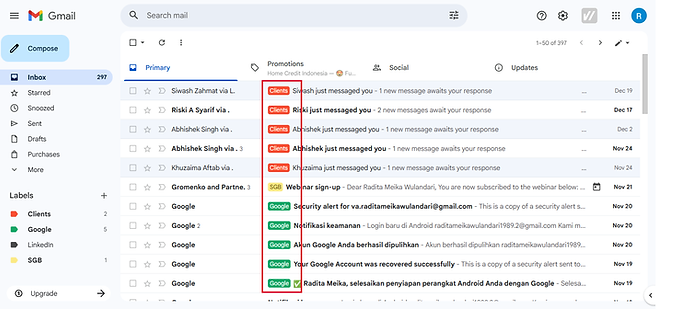
Step 3: Creating Clear Email Labels
I created clear and simple labels to separate important emails such as Clients, Google, LinkedIn, and Programs.
This helps keep the inbox organized and makes emails easier to find.

Sorting Emails by Label
Each incoming email is sorted into the right label based on its category.
Client emails are easy to identify, so nothing important is missed or delayed.
Step 4 : Setting Up a Priority Inbox for Better Focus
I set up a Priority Inbox to clearly separate important and unread emails from everything else, so critical messages are easy to see and respond to first.

Work Sample
Step 5 : Adding a Professional Email Signature
A clean and professional email signature was added to emsure clear identity and consistent communication

Work Sample
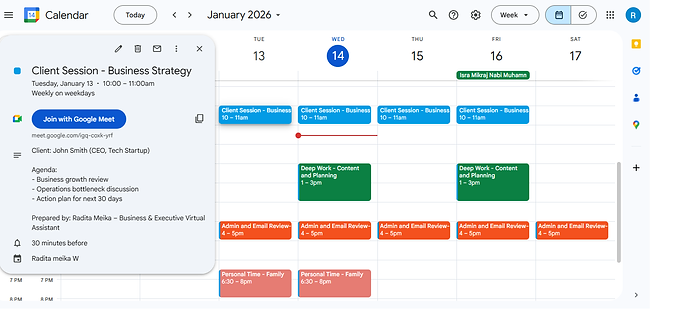
Structured Weekly Calendar for Focused Work
A clean weekly calendar setup to help CEO and coaches manage clients sessions, deep work, and personal time with clarity and balance.

Work Sample
Client Coaching Session Scheduled
I scheduled and organized a coaching session for the CEO, including meeting time, agenda, and Google Meet link to ensure a smooth and professional discussion.
Work Sample
Weekly Team Automation
I set up a recurring weekly meeting for the operations team with a clear agenda and video conference link to support consistent communication and accountability.

Work Sample
CEO Deep Work Time Blocking
I create protected focus time blocks to prevent distractions and overbooking, allowing the CEO to work on strategy and high-impact decisions.

Work Sample
Client Session Scheduling and Automated Maeeting Reminders
I organize and schedule client session with clear details, ensuring every session rums smoothly and professionally.
and I set upautomatic notification and email reminders to ensure clients and Executive never miss important meeting
